Mar 17, 2025 Adrian T

How to display a Google Map location on your HuatPage blog

It is very easy to display a Google Map location on your HuatPage blog. You can do it in just 3 steps

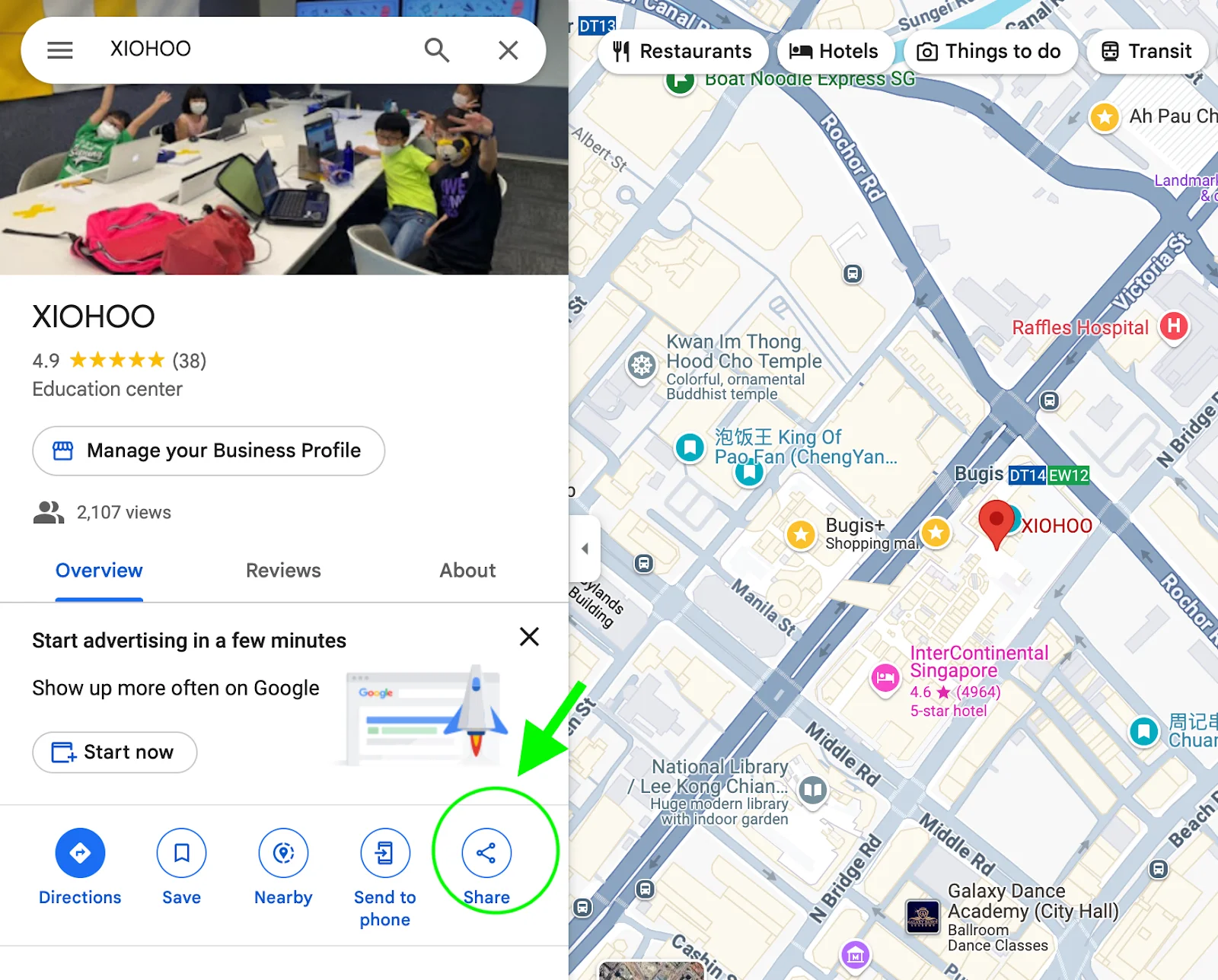
  1. Find the location on Google Map that you want to display and click on share buttonImage

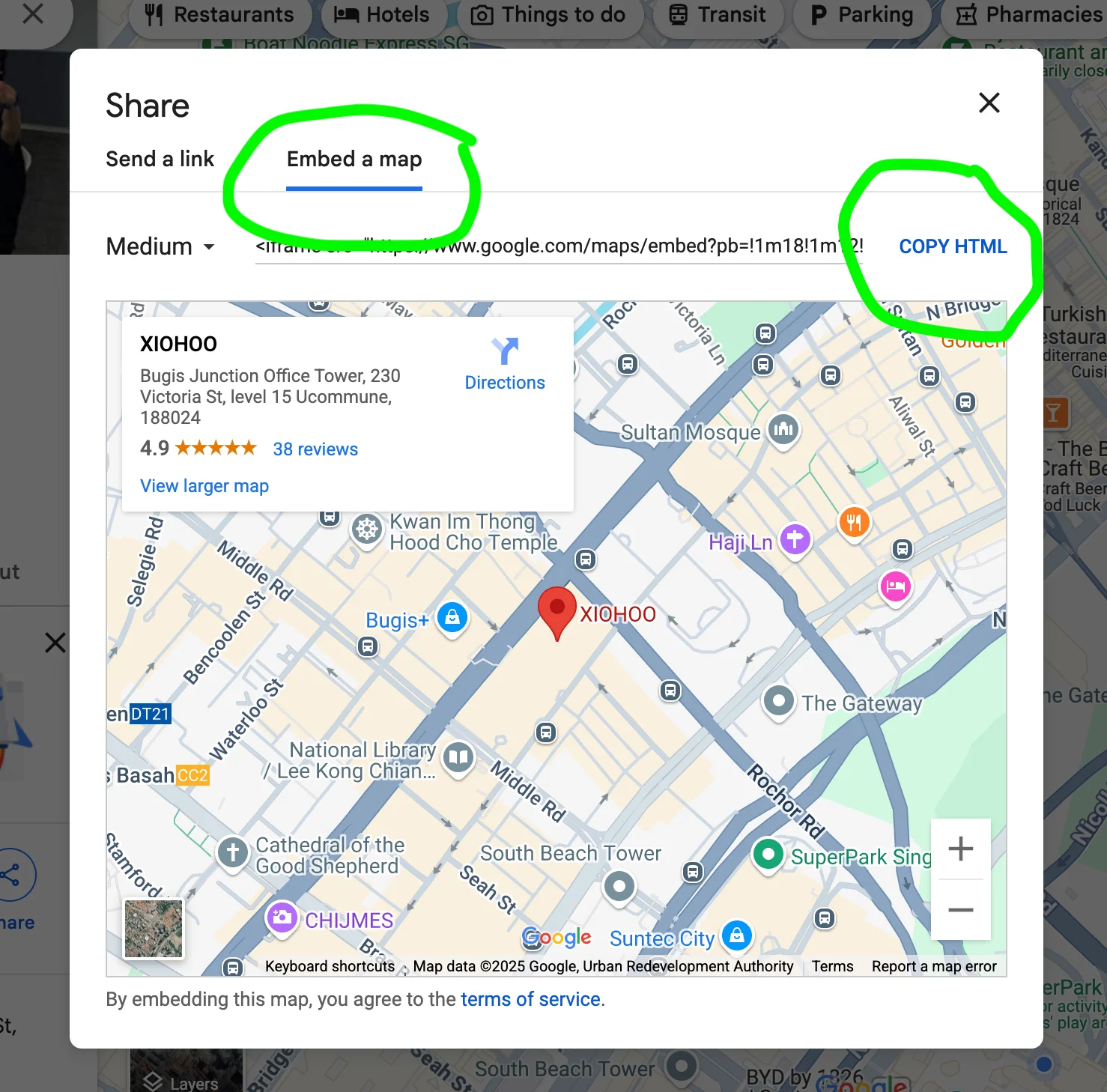
  2. Select “Embed a map” and click “COPY HTML”Image

  3. Paste the code onto your Google Docs and sync it on your HuatPage blog!

Congrats, your map is ready and displayed on your blog..

Related Posts

Technical SEO for Developers: Building a High-Performance Foundation

Technical SEO for Developers: Building a High-Performance Foundation

Unlock Your Potential: A Treasure Trove of FREE AI Tools at Your Fingertips!

Unlock Your Potential: A Treasure Trove of FREE AI Tools at Your Fingertips!

The SaaS Founder's Online Toolkit: Best Directories, Communities & Acquisition Sites

The SaaS Founder's Online Toolkit: Best Directories, Communities & Acquisition Sites

Essential Google Docs Shortcuts to Save Time

Essential Google Docs Shortcuts to Save Time

30 things you should never say to your customers when providing support

30 things you should never say to your customers when providing support

The Entrepreneurial Leap: When Your Intrapreneurial Spirit Yearns for More

The Entrepreneurial Leap: When Your Intrapreneurial Spirit Yearns for More

How to Delete a page in Google Docs

How to Delete a page in Google Docs

Why indie hackers need to use a simple solution to write a marketing blog

Why indie hackers need to use a simple solution to write a marketing blog

What is Huat Page? How does it work to create Blogs using Google Docs?

What is Huat Page? How does it work to create Blogs using Google Docs?

Level Up Your Hustle: A Beginner's Guide to SEO and Keyword Research for Solopreneurs

Level Up Your Hustle: A Beginner's Guide to SEO and Keyword Research for Solopreneurs

Why use Google Docs as a blog post editor

Why use Google Docs as a blog post editor

10 Ways a Blog Can Skyrocket Your Solopreneur Business

10 Ways a Blog Can Skyrocket Your Solopreneur Business

How to edit the title and metadata of the blog hosted on HuatPage?

How to edit the title and metadata of the blog hosted on HuatPage?

45 Attention-Grabbing Hooks for Social Media Posts

45 Attention-Grabbing Hooks for Social Media Posts

More than 20 types of Blog Posts to Try and Why They Work

More than 20 types of Blog Posts to Try and Why They Work

Essential Google Docs Shortcuts to Save Time

Essential Google Docs Shortcuts to Save Time

How to Create a Table of Contents in Google Docs Automatically

How to Create a Table of Contents in Google Docs Automatically

How to Pick the Perfect Blog Niche (With Examples) for Your Side Hustle

How to Pick the Perfect Blog Niche (With Examples) for Your Side Hustle

How to change Margins in Google Docs

How to change Margins in Google Docs

Road map of HuatPage features

Road map of HuatPage features

How to Write SEO Content That Ranks High: A Comprehensive Guide

How to Write SEO Content That Ranks High: A Comprehensive Guide

How to display a TikTok video on HuatPage Blog

How to display a TikTok video on HuatPage Blog

How to configure sub-folders blogs on your existing website with Vercel

How to configure sub-folders blogs on your existing website with Vercel

How to Track Changes by Different Writers in Google Docs

How to Track Changes by Different Writers in Google Docs

How to display a YouTube video on HuatPage Blog

How to display a YouTube video on HuatPage Blog

How to change the design of your HuatPage Blog

How to change the design of your HuatPage Blog

The Ultimate Guide to Writing Attention-Grabbing LinkedIn Posts

The Ultimate Guide to Writing Attention-Grabbing LinkedIn Posts

How to edit Google Docs without wifi or internet access?

How to edit Google Docs without wifi or internet access?