
Mar 4, 2025 • Adrian T
What is Huat Page? How does it work to create Blogs using Google Docs?
HuatPage makes blogging super easy by turning Google Docs into a Blog. It is a content management system (CMS) without managing your own servers or hosting.
Just write your posts in Google Docs like you normally would, and HuatPage takes care of the rest, automatically publishing them to your own SEO-friendly blog. No extra hassle, just effortless blogging.
How does HuatPage work with Google Docs as the CMS?
To create a blog on HuatPage, you have to link it to at least one Google Docs document.
-
You can create a new Google Doc
-
Or duplicate this starter template (https://docs.google.com/document/d/1QxnVG6bn2tjOZyUXeNnkWCDS8b4QvTjBZGFsxYqpfi0/edit?usp=sharing ) and save under your own Google account. You can name it anything you want for your reference.
-
Share the Google document with our service account email so we can link the blog with your doc.
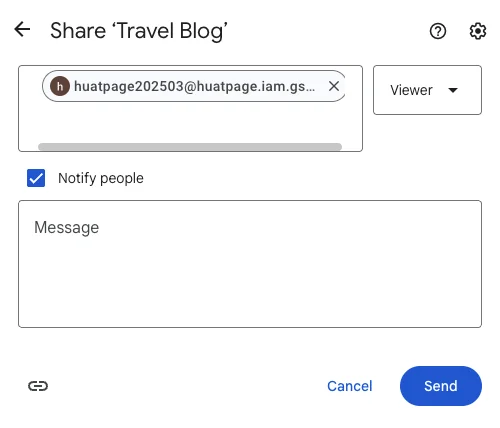
Obtain the service account email at your HuatPage settings page https://app.huatpage.com/setting . You only need to provide view permission to this service account.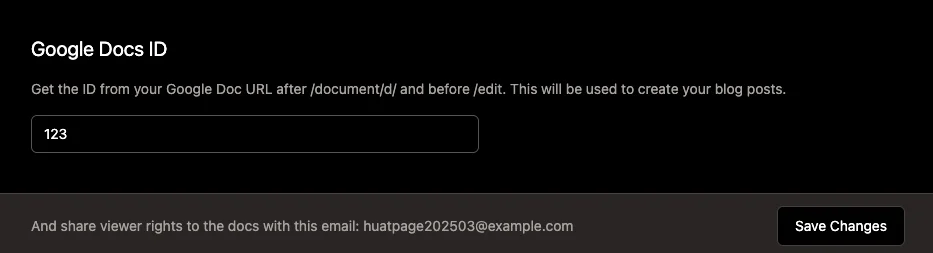
-
Write your blog post on Google docs. One tab represent one blog post

-
In your site page, press “Sync posts” to synchronise docs to your blog on HuatPage. Publish the post and your blog is ready!
How do I change the title, URL and meta title of a blog post?
The title is in the head of each tab in the document. The URL of the blog post is based on the title on the first synchronisation. If you want to customize the URL after this, you can edit the settings of this post in HuatPage.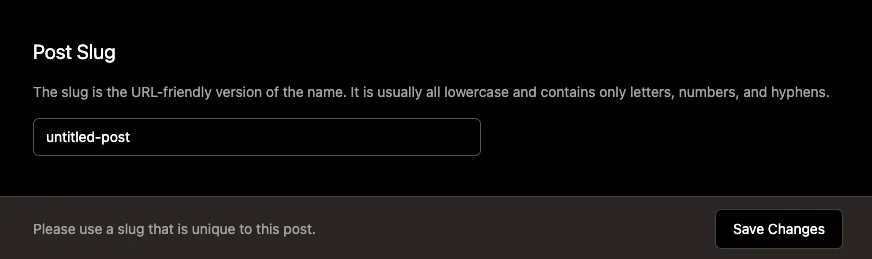
What are the published status of the new blog posts by default?
Currently, new blog posts that are synchronised in draft mode. You can publish it anytime you like.
Current blog features are are under development
-
Display tables
-
Schedule auto sync of blog post
-
Option to auto publish new blog posts
Please contact me if you need a feature. Thanks.
Related Posts

AEO vs. GEO: The Marketer's Guide to AI-Driven Search Optimization

Is Blogging Dead in 2026? The Ultimate Guide to Starting a Profitable Blog Today

Technical SEO for Developers: Building a High-Performance Foundation

How to Write SEO Content That Ranks High: A Comprehensive Guide

Unlock Your Potential: A Treasure Trove of FREE AI Tools at Your Fingertips!

How to Delete a page in Google Docs

How to change Margins in Google Docs
Essential Google Docs Shortcuts to Save Time
